Jana Gambar Pasport Guna AI — Senang Gila!
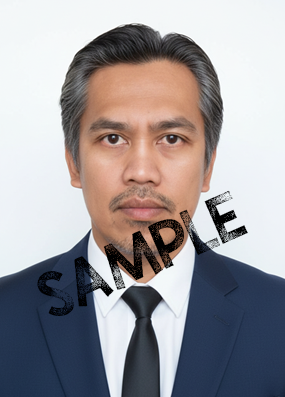
Siapa kata nak ambil gambar pasport kena pergi studio? Sekarang semua benda boleh buat dengan AI. Guna telefon pun dah boleh dapat gambar pasport yang nampak kemas, cerah dan professional look.
Hari ni kita kongsi prompt simple yang saya selalu guna. Serius, hasilnya memang puas hati. Guna Google Gemin percuma je…
Gaya Lelaki
“Generate A professional passport-style portrait of the man in the uploaded reference image He wears a navy blue suit, crisp white shirt, and black tie. No eyeglasses. Hair short, neatly combed. Expression neutral and serious like a passport/ID photo. Background is solid white, with soft frontal lighting, no gradients, no texture. Style is photorealistic, sharp, high-resolution, natural skin pores, no smoothing or beautification, no changes to facial geometry, avoid caricature/cartoon. Centered composition, straight-on camera, minimal shadows, clean edges. Aspect ratio 3:4 portrait orientation.”
Gaya Perempuan
“Generate a professional passport-style portrait of the woman, 100% identical to the uploaded reference image, wearing a gold hijab and a black suit. She has a neat and elegant appearance, with natural makeup that enhances her eyes and lips. The photo is cropped tightly to the head and shoulders, centred, with a solid white background. The style is realistic, sharp, and high-resolution, suitable for an official passport photo. Aspect ratio 3:4 portrait orientation.”
Copy, paste — siap.
Kalau nak tambah gaya rambut tertentu atau pakaian formal sikit, letak je ayat tambahan.
Tip Ringkas Untuk Gambar Lagi Menjadi
- Pastikan cahaya depan muka terang
- Rambut jangan tutup mata
- Baju warna gelap memang nampak lebih kemas
- Muka neutral — bukan senyum lebar, bukan masam sangat



Post Comment